
Legacy Software Modernization in Trichy
Older business software can keep doing its job long after the technology around it has moved on. The warning signs are usually practical: a small change takes too long, a key integration needs manual work, or the team is nervous about updating a platform that no longer has clear support.
Freshora reviews existing custom systems and helps plan a sensible path forward. That may mean updating a supported runtime, restructuring a difficult module, improving how systems exchange data, or replacing one component at a time. A complete rewrite is considered only when the assessment shows it is justified.
For a manufacturer around Thuvakudi or Tiruverumbur, a distributor near Chathiram, or an office near Cantonment, the priority is to preserve the business rules and records that staff rely on while making the system easier to change, connect and support.
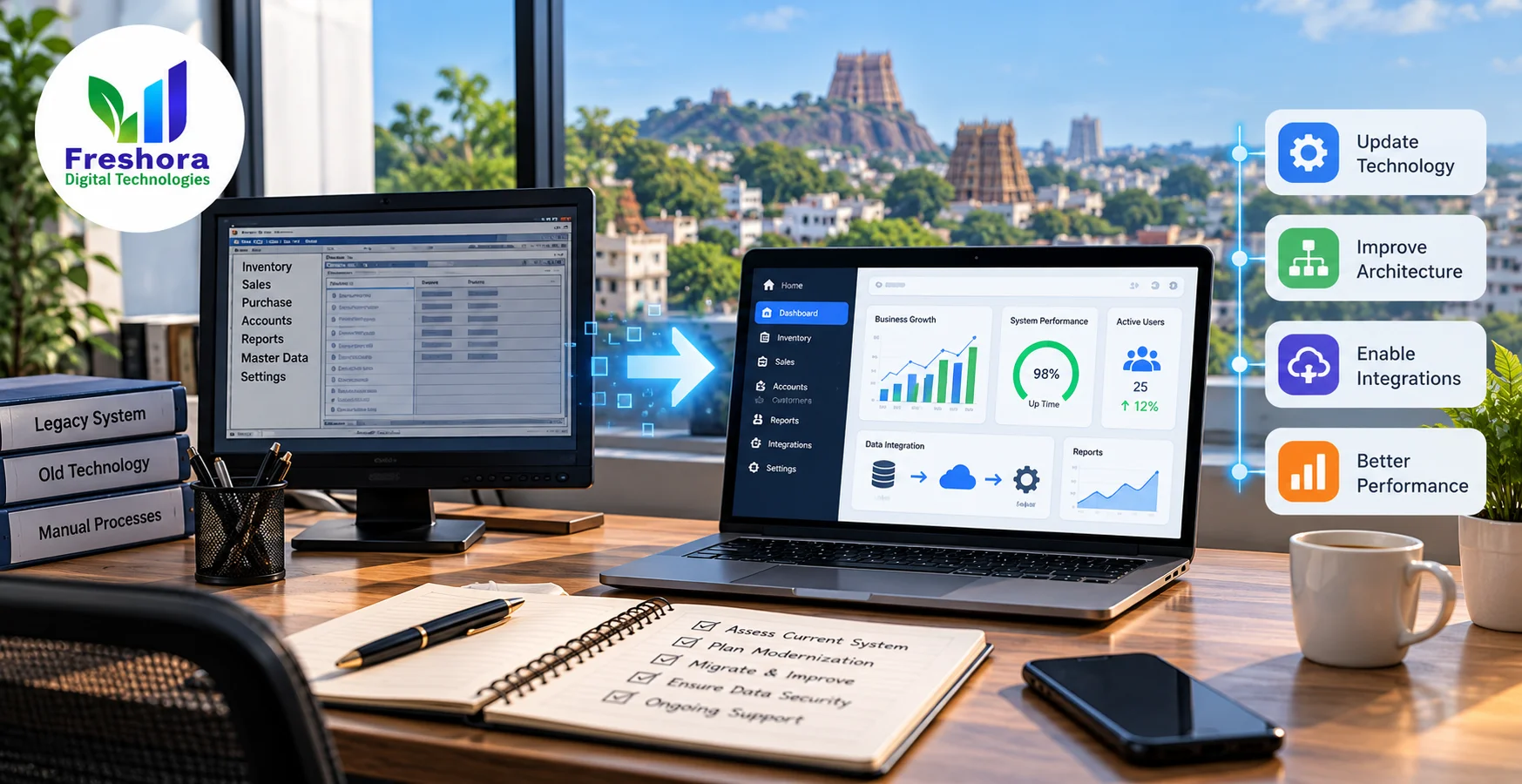
When an Older System Starts Holding Work Back
Age alone is not the problem. The bigger concern is whether the system can still be supported safely and adjusted when your business changes. Look for patterns such as:
Modernization should solve a business problem, not chase a newer technology for its own sake.
A 2025 survey of more than 500 enterprise IT decision-makers found that 68% said legacy systems were limiting their organisation's ability to adopt newer technologies. That is a global enterprise finding, not a Trichy-specific benchmark; it is a reason to assess the constraints, not to replace every older system. Read the survey summary.
What Modernization Can Look Like in Practice
Start with the component that causes the most friction
These are illustrative situations that reflect common business needs; they are not claims about named Freshora clients or completed projects.
Inventory and Billing
A trading business near Chathiram relies on an older stock and billing system that cannot exchange data cleanly with newer reporting tools.
- Map the current transaction rules
- Test a safer export or integration layer
- Reconcile stock and invoice totals
Production and Dispatch
A manufacturer in the Thuvakudi–Tiruverumbur industrial belt needs to change a dispatch workflow, but the older application has tightly connected modules.
- Map the dependencies first
- Modernise one workflow at a time
- Compare output before and after release
Reporting and Management Data
An office team around Cantonment spends time combining spreadsheets because its core system has limited reporting and integration options.
- Identify the trusted source for each field
- Improve data access in a controlled step
- Validate totals and historical records
Modernise the Parts That Create the Greatest Constraint
The solution might be a careful upgrade, a new boundary or a phased replacement
Modernization is not one fixed method. After the current system and its dependencies have been assessed, the plan may combine several of these steps. Our guide to platform migration and system stability explains why the destination platform and the migration plan both matter.
Choose the smallest safe change that addresses the real constraint, then prove it works before moving the next part.
Modernization, Maintenance or a New System?
The deciding question is not simply how old the software is. It is whether the current system can continue to meet the business need with reasonable risk and effort.
| Your situation | Relevant service | Why it fits |
|---|---|---|
| The system still supports core work, but its platform, structure or integrations limit change | Legacy software modernization | Assess, update or replace components in stages while protecting necessary workflows and data. |
| A supported custom system needs bug fixes, routine updates or small changes | Software maintenance and enhancement | Better suited to keeping a system in service rather than changing its underlying platform or architecture. |
| You need to design and build a new business system | Custom software development | Focuses on a new solution rather than improving the technical foundation of an existing one. |
| The main limitation is hosting, infrastructure or the move to a managed environment | Cloud and infrastructure support | May be appropriate when the application can be retained but its operating environment needs attention. |
A modernization review should also be willing to recommend doing nothing for now when the benefit of change does not justify the risk or effort.
Map the Details That Keep the Business Running
The safest plan starts with what must remain correct after the technology changes
Record What Must Stay the Same
The new system should preserve the rules that make day-to-day transactions correct.
Map examples such as:
- Invoice and tax calculations
- Stock adjustments and returns
- Approval steps and user roles
Find Connected Systems and Jobs
An older program may rely on scheduled tasks or connected tools that are easy to miss.
Check for:
- Accounting or supplier integrations
- Scheduled imports and reports
- Printers, APIs and file exchanges
Define How Data Will Be Checked
Moving records is not enough; the business needs confidence that they mean the same thing in the new environment.
Agree checks for:
- Required fields and record IDs
- Transaction counts and financial totals
- Duplicates, gaps and historical records
Decide What a Safe Release Means
Write down the checks the team needs to pass before it relies on the changed system.
Set clear criteria for:
- Testing a realistic sample workflow
- Who approves the transition
- Rollback or recovery if checks fail
The team does not need to document every technical detail on day one. Start with the most business-critical process and build the dependency map as the assessment progresses.
Modernise in Steps, Not Guesswork
Understand dependencies first, then validate each meaningful change
Assess the Existing System
Review code, platform support, data stores, integrations and the workflows the business cannot afford to lose.
Prioritise by Business Risk
Separate urgent support or security concerns from improvements that can wait, and define the outcome for each change.
Choose the Modernization Route
Decide whether to refactor, replatform, restructure or replace a specific component based on evidence and dependencies.
Build and Validate a Small Step
Test a contained part with representative data and compare its outputs with the existing process.
Rehearse Data and Cutover
Run trial migrations, reconcile records and agree the release checks and recovery path.
Release, Monitor and Document
Move the agreed component into use, check real business tasks and record what changed for future support.
Some systems can be updated in small steps; others have dependencies that require a broader transition plan. The approach and timeline should follow the actual system, not a promise of zero downtime.
Supporting Businesses Across Tiruchirappalli
Modernization plans built around the systems local teams actually use
Business systems often reflect years of local working practices: how a showroom handles returns, how a distributor reconciles stock, or how a manufacturing team records production and dispatch. A modernization plan needs to understand these details before changing the technology underneath them.
Freshora works with businesses across Trichy, including the following localities and nearby business areas.
Areas We Serve
Frequently Asked Questions
- It improves an older existing system’s code, platform, architecture, integrations or data handling so it better meets current business needs. The right approach may be a framework update, refactoring or phased component replacement—not always a complete rewrite.
- No. Age alone is not enough reason to replace software. The decision depends on support status, security exposure, change effort, compatibility, business importance and the cost and risk of available options.
- Yes, subject to appropriate access and ownership permissions. We begin by reviewing the source code, deployment setup, dependencies, available documentation and the business workflows the system supports.
- We plan data mapping, trial transfers and validation checks. Where appropriate, this includes verified backups, access controls, reconciliation of key totals and agreed cutover or rollback steps before the live transition.
- Often, yes. If the system allows it, lower-risk components can be modernised first while essential workflows continue. The sequence depends on dependencies, data consistency and acceptable downtime.
Get Call Back in 10 Mins
Our expert will call you shortly to understand your needs and help grow your business.
Is Your Existing Software Becoming Hard to Change?
Legacy system assessment and phased modernization in Trichy
Tell us what the system does today, which parts are difficult to maintain or connect, and what your team needs to keep working.
You do not need a complete technical specification. A workflow example, system diagram, known platform version or list of recurring constraints is a useful starting point.
We will review the information and discuss practical options before recommending whether to update, restructure, migrate or replace any part of the system.
Understand What You Have. Modernise What Matters. Validate Every Step.
A sound modernization plan protects the business work and records the software already supports.
Related Blogs
Latest insights & updates



Stay Updated 📩
Get exclusive digital marketing tips, SEO insights, web & app updates, and job opportunities delivered straight to your inbox.
Join Our WhatsApp Channel 💬
Join our WhatsApp channel for instant digital marketing tips, SEO insights, web & app updates, and latest job opportunities.
Join NowServing Businesses Across Trichy, India & Worldwide
Freshora Digital Technologies proudly serves businesses across Tiruchirappalli (Trichy), including Cantonment, Puthur, Thillai Nagar, Palakarai, Subramaniyapuram, Mela Chinthamani, Woraiyur, KK Nagar, Karumandapam, Crawford, Edamalaipatti Pudur (EMP), Kattur, Airport Area, Ariyamangalam, Panjappur, Thuvakudi, Tiruverumbur, BHEL Township, Srirangam, Thiruvanaikaval, Samayapuram, No.1 Tollgate, Central Bus Stand Area, and Chathiram Bus Stand Area.
We also serve clients across Tamil Nadu, India, and globally in Singapore, the UAE, Saudi Arabia, Canada, Australia, the United Kingdom, and the United States, delivering innovative Website Development, Mobile App Development, Software Development, SEO, Google Business Profile Management, and Digital Marketing solutions that help businesses grow and succeed in the digital world.


Website Audit Free
R
E
E
A
U
D
I
T
R
E
P
O
R
T